The Refresh Token That Wouldn't Die
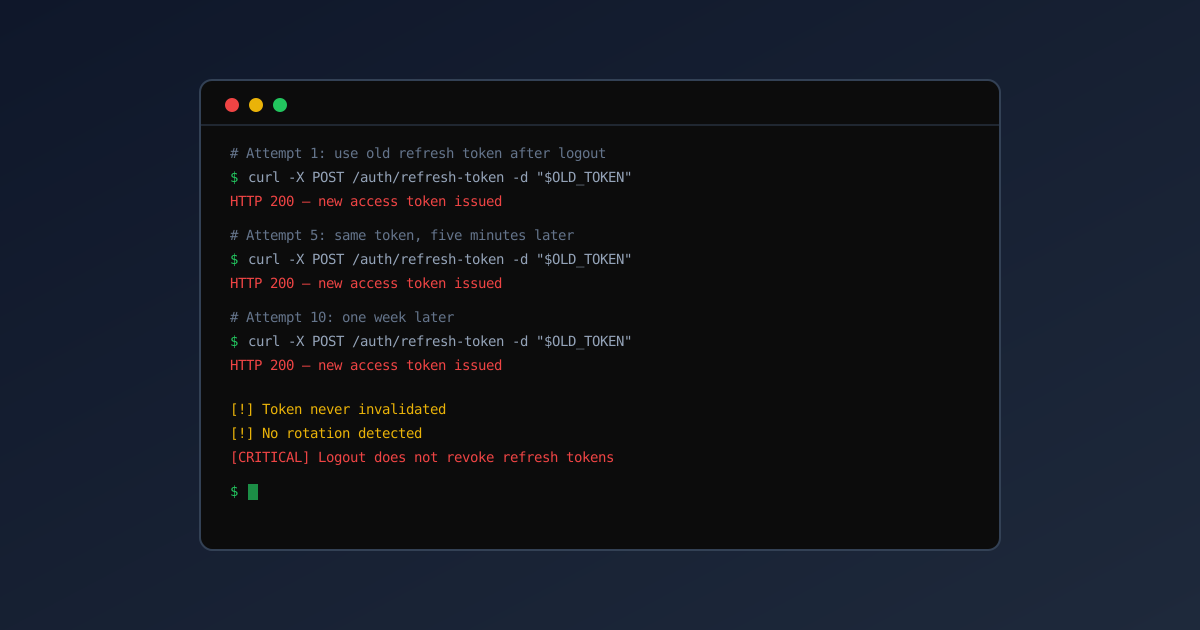
I logged out. Then I used my old refresh token. It still worked.
I used it again. Still worked. Five times. Ten times. A week later. Still worked.
This is a story about a refresh token that refused to die, and why “we use JWTs” is not a security strategy.
How Refresh Tokens Are Supposed to Work
Quick primer for anyone who hasn’t thought about this in a while.
When you log in, the server gives you two tokens:
- Access token – short-lived (ours: 24 hours), used for every API request
- Refresh token – longer-lived (ours: 30 days), used to get a new access token when the old one expires
The flow should be:
1
2
3
4
5
6
1. Login → get access_token + refresh_token
2. Use access_token for API calls
3. Access token expires after 24h
4. Send refresh_token to /api/auth/refresh-token
5. Get NEW access_token + NEW refresh_token
6. OLD refresh_token is invalidated ← THIS IS THE IMPORTANT PART
Step 6 is called refresh token rotation. The old token dies when the new one is born. If someone steals your old refresh token after you’ve rotated, it’s useless.
Our API skipped step 6.
The Discovery
I was testing the auth flow on staging. Standard stuff: login, check the token, verify it expires. Then I wondered: what happens to the old refresh token after I use it?
Throughout this post, I’m using
$APIas the base URL. Set it to your own target:
1
2
3
4
5
6
7
# Login
RESPONSE=$(curl -s -X POST "$API/api/auth/signin" \
  -H "Content-Type: application/json" \
  -d '{"email":"[email protected]","password":"TestPassword123"}')

REFRESH=$(echo "$RESPONSE" | python3 -c "import sys,json; print(json.load(sys.stdin)['data']['refresh_token'])")
echo "Got refresh token: ${REFRESH:0:20}..."
Now use it to get a new token pair:
1
2
3
4
5
# First use -- expected to work
curl -s -X POST "$API/api/auth/refresh-token" \
  -H "Content-Type: application/json" \
  -d "{\"refresh_token\":\"$REFRESH\"}"
# HTTP 200 -- new tokens generated ✓
So far so good. But what happens if I use the same old token again?
1
2
3
4
5
# Second use -- should fail if rotation is implemented
curl -s -X POST "$API/api/auth/refresh-token" \
  -H "Content-Type: application/json" \
  -d "{\"refresh_token\":\"$REFRESH\"}"
# HTTP 200 -- new tokens generated... wait
HTTP 200. New tokens. From the same refresh token I already used.
1
2
# Third, fourth, fifth use -- same old token
# HTTP 200, 200, 200 -- all succeed
The refresh token is immortal. It just keeps working. No invalidation. No rotation. No limit on how many times you can use it.
Why This Is Bad
“So what? The user already had a valid refresh token. They’re just getting new access tokens.”
Here’s the scenario that makes it dangerous:
Day 1: You log into the app on a shared computer at a conference. The refresh token gets stored in the browser.
Day 2: You leave the conference. Someone else sits down at that computer. They open the browser dev tools and copy your refresh token from localStorage.
Day 15: You change your password because you’re being responsible.
Day 16: The person with your stolen refresh token uses it. It still works. Your password change did nothing to invalidate existing refresh tokens.
Day 30: Still works. The refresh token is valid for 30 days from when it was issued. Not from when the password was changed. Not from the last use. From the original issue date.
And every time they use it, they get a brand new access token valid for 24 hours. So effectively, one stolen refresh token = 30 days of unlimited access, regardless of password changes.
What the Code Does
I looked at the refresh token implementation. The endpoint does three things:
- Verify the JWT signature (is this a valid token we issued?)
- Check the expiration (is it within 30 days?)
- Generate new tokens
What it doesn’t do:
- Check if the token was already used
- Invalidate the old token after generating new ones
- Store token hashes in the database
- Check if the user’s password has changed since the token was issued
- Provide any mechanism to revoke specific tokens
The refresh token is just a signed JWT. The server has no memory of which tokens it has issued or which ones have been used. It’s stateless in the worst possible way.
The Refresh Token Family Problem
The industry-standard fix is called refresh token rotation with family tracking. Here’s how it works:
1
2
3
4
5
6
7
8
9
10
11
12
13
14
15
16
17
18
19
20
Login:
  → Issue refresh_token_1 (family_id: ABC, generation: 1)
  → Store hash in database: {family: ABC, gen: 1, used: false}

First refresh:
  → Receive refresh_token_1
  → Check: family ABC, gen 1, used=false ✓
  → Mark refresh_token_1 as used
  → Issue refresh_token_2 (family: ABC, gen: 2)
  → Store: {family: ABC, gen: 2, used: false}

Second refresh (with token_2):
  → Check: family ABC, gen 2, used=false ✓
  → Normal rotation continues

Second refresh (with stolen token_1):
  → Check: family ABC, gen 1, used=TRUE ✗
  → REUSE DETECTED!
  → Invalidate ENTIRE family ABC
  → Force re-login for user
The “family” concept is the key insight. If a used token is presented again, it means either:
- The user is confused (unlikely – the app handles this automatically)
- Someone stole the token (likely)
Either way, the safest response is to nuke the entire token family and force the user to log in again. This is what Auth0, Okta, and most serious auth providers implement.
What About Logout?
There isn’t one. Or rather, there’s a frontend “logout” that clears the token from the browser. But the token itself is still valid on the server. If someone copied it before the user “logged out,” it keeps working.
A real logout would need a server-side token revocation list. Something like:
1
2
3
4
5
6
7
@Post('/logout')
@Authorized()
async logout(@CurrentUser() user: User, @Body() body: { refresh_token: string }) {
  // Add to revocation list (or delete from allowed tokens)
  await this.tokenRepository.revoke(body.refresh_token);
  return { success: true };
}
But since the server doesn’t track tokens at all, there’s nothing to revoke. The “logout” is a frontend-only operation. It’s closing your eyes and hoping the monster goes away.
The Cascade
Here’s what makes this finding compound with others in this audit:
- No token rotation means a stolen token provides 30 days of access
- No
audclaim in JWT means a token from any frontend works on all frontends - X-Forwarded-For bypass means brute-force attempts aren’t rate-limited
- Finance BOLA means any authenticated user can read any finance record
Chain them: steal one refresh token → access any frontend → read any finance record → extract accounting system customer data + auto_login tokens → access more accounts.
Each finding alone is “concerning.” Together, they’re a persistent access pipeline.
The Fix
Status update: This is the fix we’re building, not the fix that’s live. The code below is what token rotation with family tracking looks like. As of this writing, the old tokens are still out there doing their immortal thing. We’re shipping this, but I’m not going to pretend it’s deployed when it isn’t.
The fix has three parts:
1. Token rotation with family tracking:
1
2
3
4
5
6
7
8
9
10
// On refresh:
const existing = await this.tokenRepo.findByHash(hash(oldToken));
if (existing.used) {
  // Reuse detected -- invalidate entire family
  await this.tokenRepo.revokeFamily(existing.familyId);
  throw new UnauthorizedError('Token reuse detected');
}
existing.used = true;
await this.tokenRepo.save(existing);
// Issue new token in same family
2. Password change invalidation:
1
2
3
// On password change:
await this.tokenRepo.revokeAllForUser(user.id);
// All existing refresh tokens become invalid
3. Server-side logout:
1
2
// On logout:
await this.tokenRepo.revokeByHash(hash(refreshToken));
None of these are exotic. They’re standard patterns. But they all require the server to maintain state about issued tokens. That means a database table, which means the system isn’t “purely stateless” anymore.
That’s the tradeoff. Pure statelessness is convenient until someone steals a token.
The Uncomfortable Question
I sat with this finding for a while before writing it up. How many refresh tokens are already out there?
Every user who has ever logged in has a refresh token floating around somewhere. In a browser’s localStorage. In a cached HTTP response. In a log file that shouldn’t have logged auth responses but did. Every single one of those tokens is valid for 30 days from issue. There’s no way to revoke them without building the revocation system first.
That’s the thing about stateless auth. It’s great until you need to revoke something. Then you realize the whole point of being stateless was to avoid having a token database, and now you need a token database.
The tokens are out there. They work. And there’s nothing we can do about the ones already issued except wait 30 days for them to expire.
New tokens, though, those we can fix. And we should, before someone finds one of the old ones.
This is part of the Breaking My Own Infrastructure series, where I document pentesting our own systems.